Company Data Archive
Enhancement for Microsoft Dynamics GP
Company Data Archive (CDA) is an ideal way to move historical information from your ‘live’ company to an ‘archive’ company. Archiving your data will reduce the size of your live company database and improve system performance while posting, running reports, performing file maintenance, and day-to-day use of Dynamics GP.
Why Do You Need To Archive?
Company Data Archive can increase performance while posting or running reports, streamline your data by eliminating clutter, enable faster upgrades & backups, reduce hardware costs & optimize disk space and easily view historical data with cross-company inquiries.


Find Out More About Company Data Archive
Features & Benefits
How CDA Works
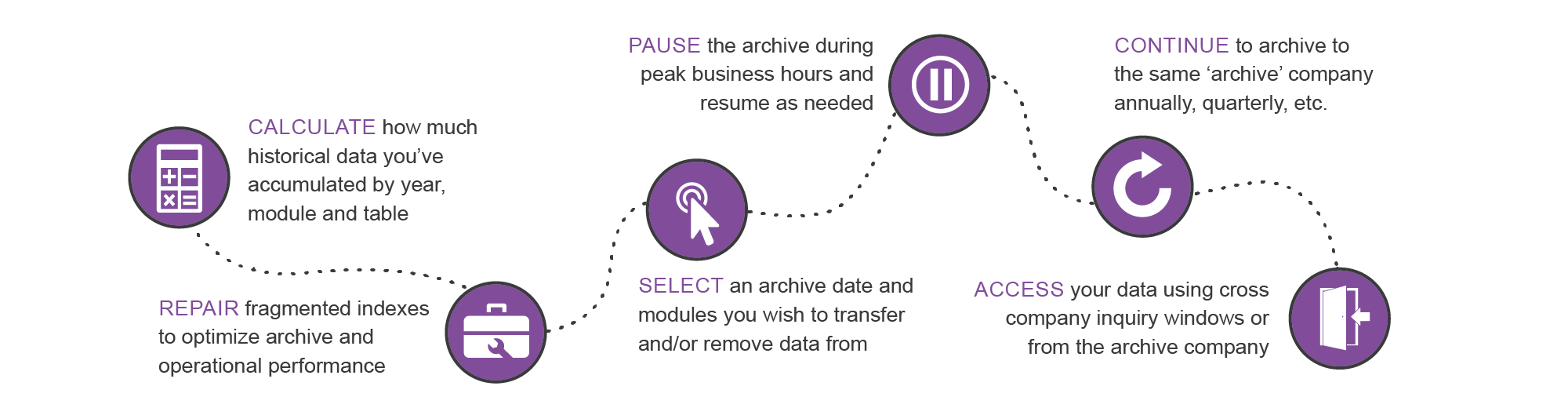
Benefits of Archiving
Company Data Archive allows you to move data form a live company in Microsoft Dynamics GP to an archive company. The benefits of archiving your historical data include:
- Streamlining your database by eliminating clutter in inquiries and reports by condensing your data set to contain only new/relevant data.
- No more scrolling through old transactions.
- Increase Dynamics GP performance. Including: improved postings, lookup times, report generation and other GP performances by reducing the size of the tables in the live company.
- Faster upgrades and backups.
- Less data in the live company means less time spent upgrading and running back-ups and restore processes.
- Optimize disk space and reduce hardware costs by archiving data onto a different server or less expensive disk drive, freeing up space on higher performance storage devices.
Partners & Customers



Learn More

Knowledge Base
Got a question? Try here first

Support
Expert Company Data Archive Support

Company Data Archive Resources
Check out our extensive resource library
Request a Demo - Company Data Archive
Upcoming Events
Webinar 30 Apr 2024 10:00 AM
B4B is the interface between your payables solution and your banks, streamlining and standardizing payment processing across your entire organization.
Register
Webinar 01 May 2024 12:00 PM
FREE WEBINAR. Company Data Archive (CDA) provides an easy way to move historical information from your live company to an archive company.
Register
Webinar 07 May 2024 11:00 AM
B4B is the interface between your payables solution and your banks, streamlining and standardizing payment processing across your entire organization.
Register
Webinar 08 May 2024 1:00 PM
FREE WEBINAR. Improve cash flow, streamline your processes, and reduce bad debt with Collections Management.
Register
Webinar 15 May 2024 1:00 PM
Company Data Archive (CDA) provides an easy way to move historical information from your live company to an archive company.
RegisterCompany Data Archive Blogs
{{ blog.Title }}
{{ blog.Description }}